BACKGROUND
Reading architecture patterns does not give you practice uncovering requirements from an ambiguous brief and turning them into a system. I wanted a place to repeat the whole process, from asking questions to revising a design.
APPROACH
Interview an AI client, place and connect components such as servers and databases, and submit the diagram with your rationale. Reflect on feedback covering availability, scalability, security, maintainability, cost, and feasibility.
HOW IT WORKS
- 01
Choose a scenario
Start with a preset or define your own design challenge
- 02
Find requirements
Ask the AI client about budget, scale, and constraints
- 03
Draw the system
Connect components and explain your technology choices
- 04
Revisit the design
Use six-dimension feedback to improve your architecture
ARCHITECTURE
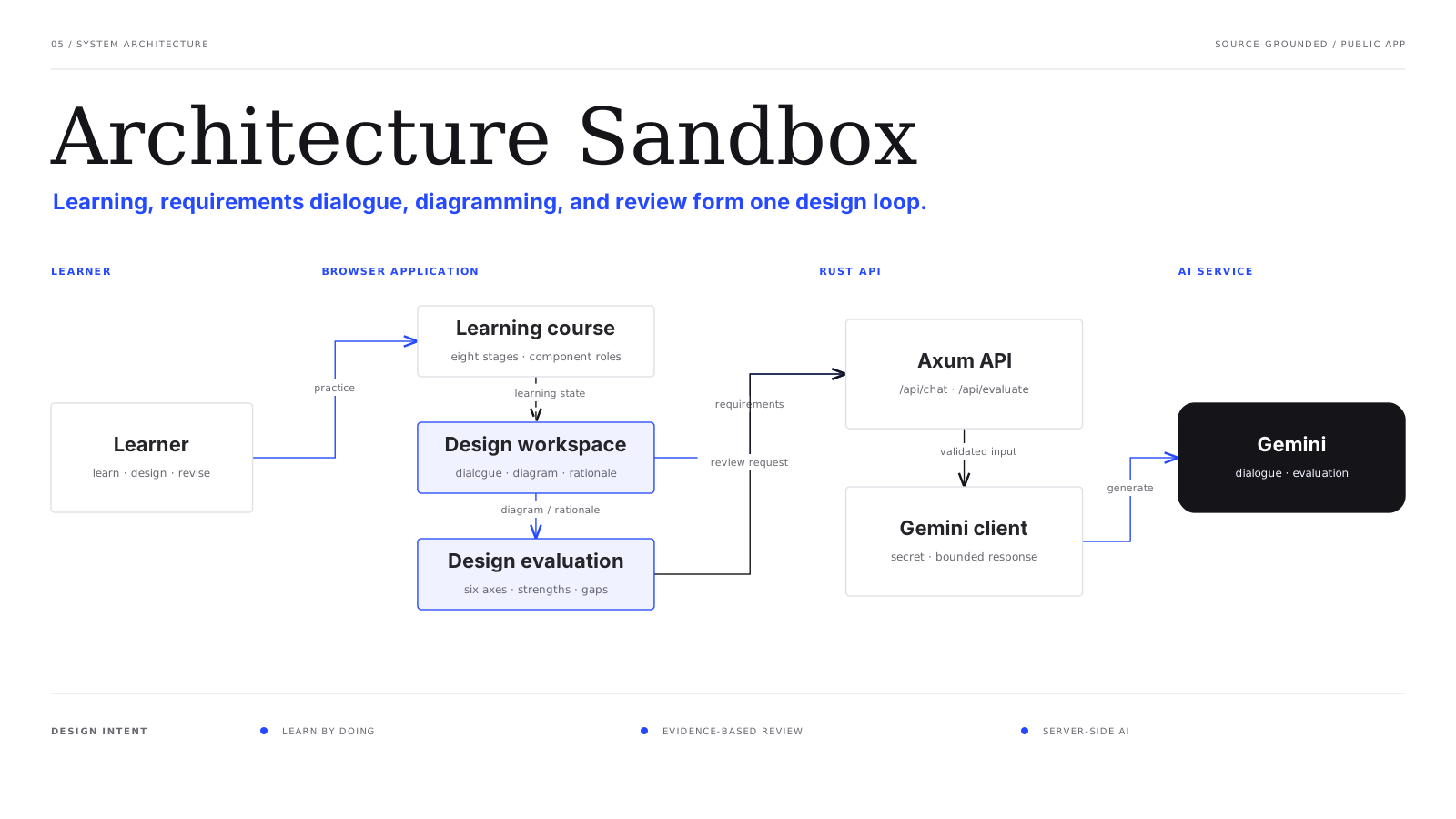
DESIGN DECISIONS
Keep the conversation and canvas together
The requirements interview and React Flow diagram belong to the same project. Component notes are included in the evaluation so you can revisit both the structure and the reasons behind it.
Separate static delivery from the AI API
Cloudflare Workers Static Assets serves the frontend, while Cloud Run hosts the Rust / Axum API. Secret Manager supplies the Gemini API key only to the server, which also holds the hidden requirements for preset scenarios.
Let people take their practice home
Save diagrams, conversations, and evaluations as a JSON file and restore them to continue later. Challenge URLs share a scenario so someone else can explore a different design for the same brief.
Share results on X and try the same challenge
The evaluation screen’s share button opens an X post composer with the scenario name, total score, and challenge URL. Anyone following the link can try the same scenario and compare their approach to yours.
VERIFICATION
- Public app supports scenario selection, interviews, diagramming, and evaluation
- Diagram connections and JSON save and restore verified in production
- GitHub Actions deploys to Cloudflare and Cloud Run
STATUS & NEXT
The web app is public. Practice with attendance management, a photo-sharing SNS, or a custom scenario; interview the AI client, draw and evaluate an architecture, save and restore JSON files, and share results and challenge URLs on X. The app interface is in Japanese.